


Top Mistakes to Avoid When Using Your $5 Off $25 Dollar General Saturday Coupon
If you shop at Dollar General on Saturdays, you already know how exciting that $5 off $25 coupon can be! But if you’ve ever gotten to the register expecting one total and ended up paying more, you’re definitely not alone.
Between sale prices, instant savings, manufacturer coupons, store coupons, and different register systems, there are several things that can affect your final total.
At Crazy For Couponing, we want you to feel confident walking into Dollar General with your Saturday breakdown ready.
Let’s go over the biggest mistakes shoppers make and how to avoid them.
How Does the Dollar General $5 Off $25 Coupon Work?
The Dollar General Saturday $5/$25 coupon takes $5 off a qualifying purchase of $25 or more before tax.
Your qualifying subtotal is generally calculated using current sale prices after instant savings but before eligible manufacturer coupons and tax.
Store coupons can affect the qualifying total depending on the promotion and how the register processes the discounts.
Mistake #1: Not Clipping Your $5/$25 Coupon Before Saturday
One of the easiest mistakes to make is waiting until Saturday morning to clip your coupon.
The Dollar General app can sometimes experience technical problems, especially when a large number of shoppers are trying to access their accounts.
My recommendation is simple: Clip your Saturday $5/$25 digital coupon as soon as it becomes available.
- Open your Dollar General app.
- Make sure you’re signed into the correct account.
- Find the Saturday $5/$25 coupon.
- Clip it to your account.
- Double-check the expiration date and coupon terms.
Mistake #2: Relying on the Dollar General App to Do Your Math
The Dollar General app is a helpful shopping tool, but it isn’t always accurate when calculating your final checkout total.
Sometimes it displays regular prices instead of sale prices, or it may show coupons that don’t actually attach at the register.
Example: Dollar General Soda Sale
Let’s say a soda promotion is advertised at 3 for $15.
Even if the original prices add up to $21, only the $15 sale price counts toward your qualifying subtotal.
Correct Sale Price Calculation
Use Our Dollar General Planning Sheet
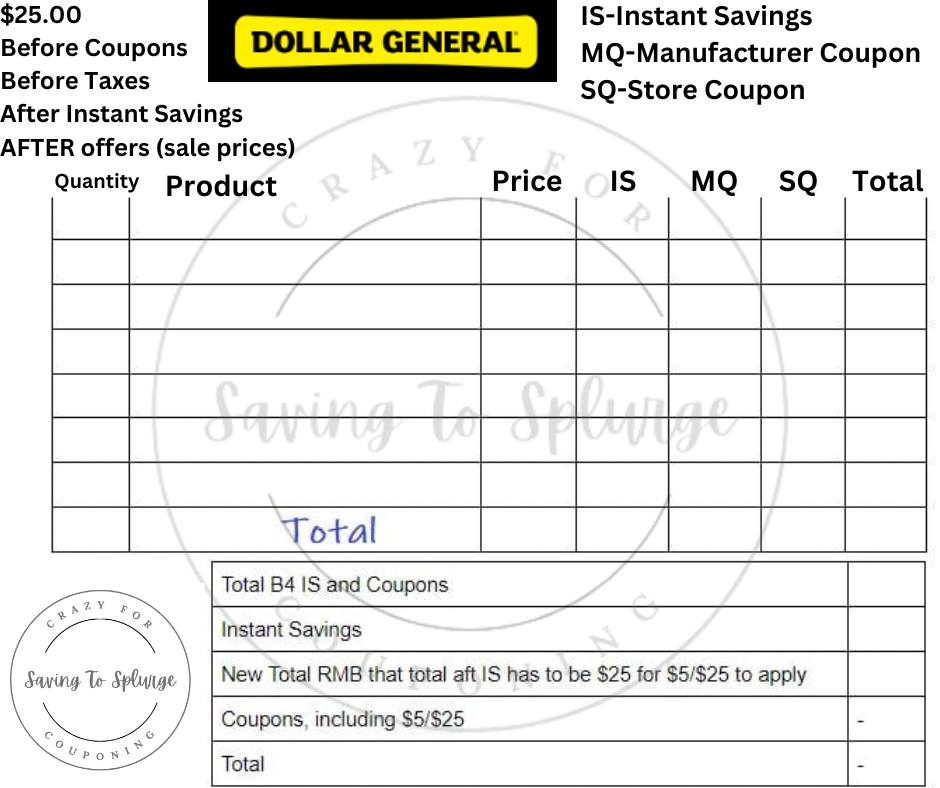
One of the easiest ways to avoid this mistake is to write everything down before shopping.
We’ve created a Dollar General planning sheet to help you organize product prices, instant savings, manufacturer coupons, and store coupons.
You can save the image beside this paragraph and print it for your next Saturday shopping trip.
Planning ahead helps you know exactly how much you need to spend and which coupons should apply.
Mistake #3: Not Understanding Dollar General Coupon Stacking Rules
This is another area that causes confusion, especially for newer couponers.
Manufacturer vs. Store Coupons
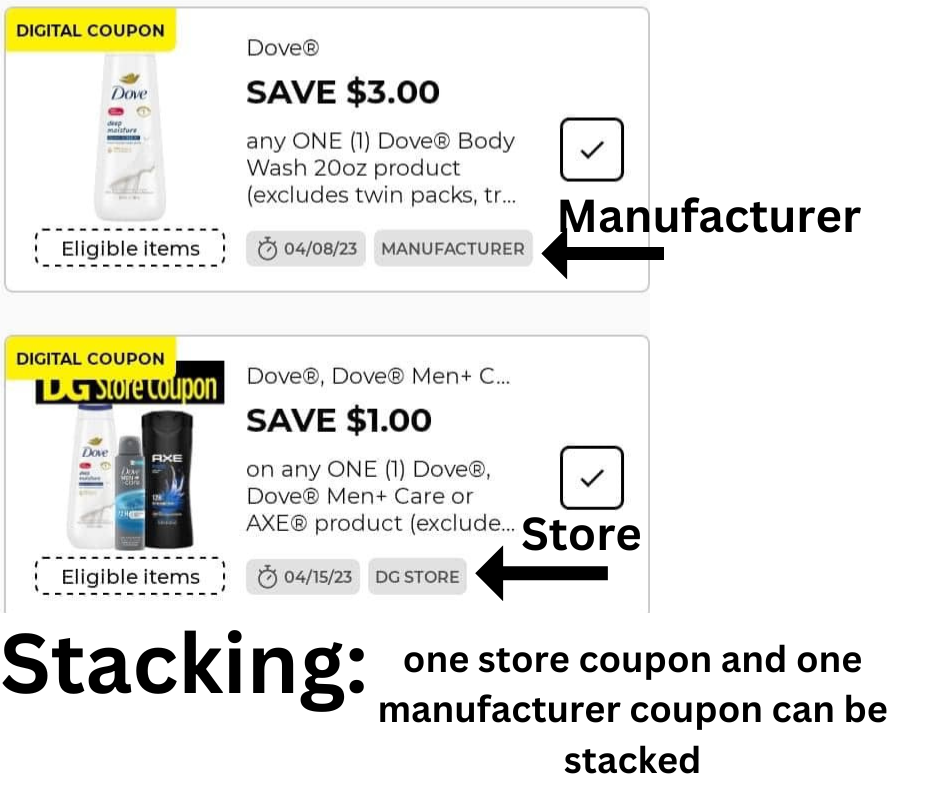
At Dollar General, you may be able to combine one eligible manufacturer coupon with one eligible Dollar General store coupon on the same product.
However, you cannot stack multiple manufacturer coupons on the same item.
Manufacturer coupons are issued by the product manufacturer, while Dollar General store coupons are store-issued offers.
The label on your digital coupon matters because it helps you understand how that coupon may interact with other discounts.
Always check the product requirements, coupon limits, and exclusions before shopping.
Mistake #4: Not Scanning Products While Shopping
Just because a product looks like the correct item doesn’t mean your digital coupon will attach.
Different sizes, scents, varieties, and package counts can affect coupon eligibility.
How to Scan Products
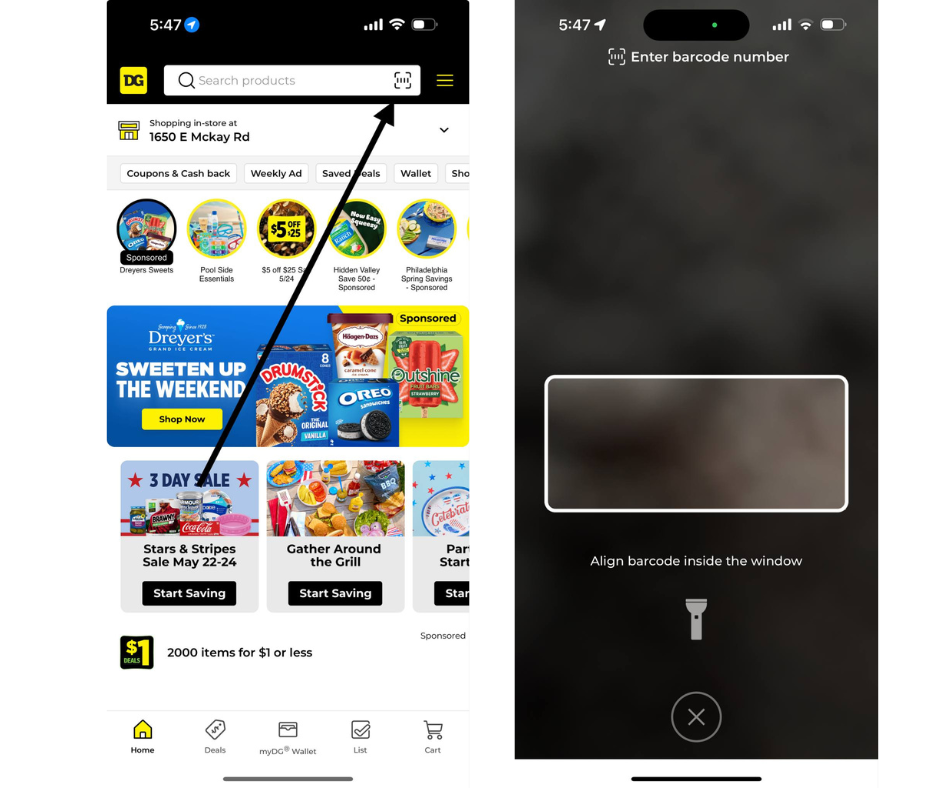
Use the Dollar General app barcode scanner to check whether the product matches your clipped coupons.
- Open the Dollar General app.
- Select your preferred store.
- Tap the barcode scanner icon near the search bar.
- Scan the product’s UPC barcode.
- Review the displayed price and eligible coupons.
- Check the coupon details before adding the item to your cart.
Scanning can help you catch mistakes before checkout, but always verify the final register price.
Mistake #5: Not Understanding Your Store’s Register System
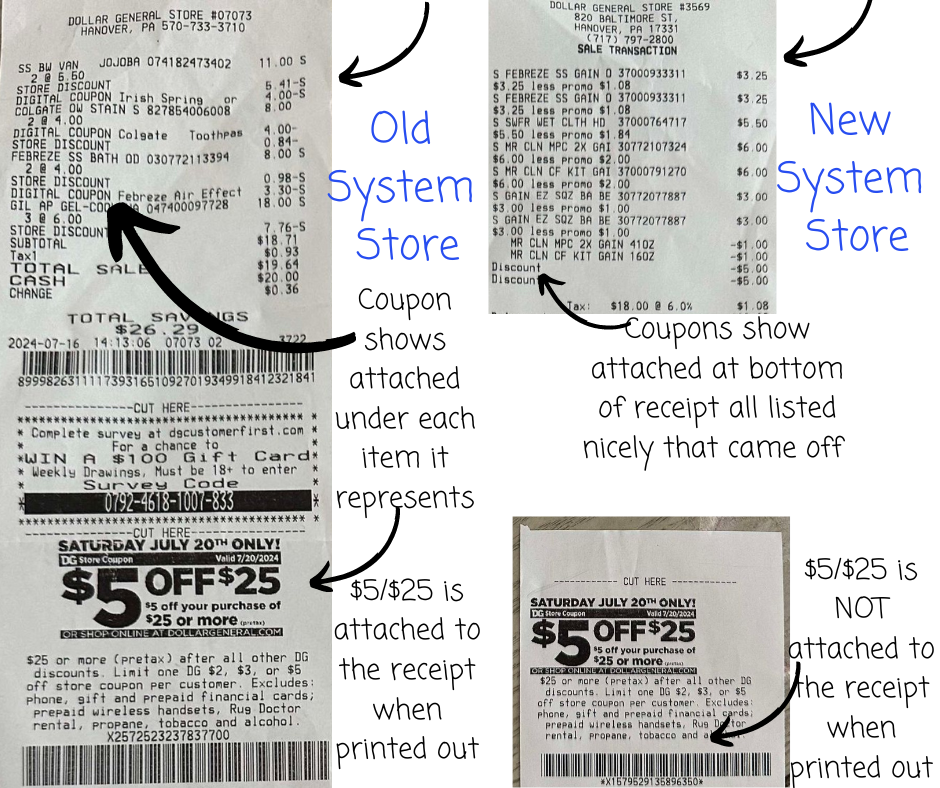
Dollar General stores have operated with different point-of-sale register systems, and those systems can display and process discounts differently.
Why Your Register System Matters
One of the differences shoppers noticed involved how Dollar General store coupons affected the $5/$25 qualifying subtotal.
On some older receipts, discounts appeared beneath individual products.
On newer receipt formats, certain discounts appeared grouped toward the bottom of the transaction.
Because software and register systems can change, this comparison is a historical guide rather than a guarantee of current processing.
Always check your receipt and account for store coupons that may reduce your qualifying subtotal.
Example: Using a $3 Dollar General Store Coupon
If a $3 store coupon reduces your qualifying subtotal before the $5/$25 is evaluated, you’ll need enough merchandise to remain at $25 after that discount.
When a $3 Store Coupon Reduces the Threshold
Mistake #6: Forgetting That Instant Savings Reduce Your Subtotal
This is one of the biggest reasons shoppers lose their Saturday $5/$25 discount.
Dollar General frequently offers instant savings promotions, such as saving $3 instantly when you spend $15 on qualifying products.
That $3 comes off before the $5/$25 qualifying subtotal is calculated.
Incorrect Calculation
Correct Calculation
Bonus Mistake #7: Trying to Stack Two Basket Coupons
Dollar General occasionally offers different basket coupons, including $5/$25 Saturday coupons and $5/$30 Gain offers.
These basket coupons generally cannot be stacked together in one transaction.
Don’t assume you’ll receive both $5 discounts. Check the offer terms and plan your transaction around the basket coupon you intend to use.
Bonus Mistake #8: Using the Wrong Checkout Order
If you’re combining paper and digital coupons, the order you present them may matter.
- Have the cashier scan all your products.
- Present your paper $5/$25 basket coupon first, if using one.
- Enter the phone number associated with your digital coupon account.
- Allow the register to process eligible digital offers.
- Verify your final total before completing payment.
For digital-only transactions, make sure your Saturday coupon is clipped before entering your phone number.
Understanding the Correct $5/$25 Calculation
| Step | What to Do |
|---|---|
| 1 | Add your products using current sale prices. |
| 2 | Subtract applicable instant savings. |
| 3 | Account for store coupons that reduce the qualifying subtotal. |
| 4 | Make sure the qualifying subtotal is at least $25 before tax. |
| 5 | Apply your eligible $5/$25 basket coupon. |
| 6 | Subtract eligible manufacturer coupons. |
| 7 | Add applicable tax. |
Example of a Simple Dollar General Saturday Deal
Dollar General $5/$25 Example
That’s $27 worth of sale-priced merchandise for just $12 before tax, assuming all coupons attach and the transaction meets the offer terms.
What If Your Dollar General $5/$25 Coupon Doesn’t Come Off?
If your coupon doesn’t apply, review your transaction before assuming the register made an error.
- Was your $5/$25 coupon clipped?
- Did you enter the correct phone number?
- Is the coupon valid for that Saturday?
- Are all your products eligible?
- Did sale prices reduce your subtotal?
- Did instant savings bring your total below $25?
- Did a store coupon reduce your qualifying amount?
- Are you trying to use another basket coupon?
- Did every manufacturer coupon match the correct product?
Should You Use Paper or Digital $5/$25 Coupons?
Both can be useful depending on what is available and what your store accepts.
The digital coupon is convenient because it stays attached to your Dollar General account once clipped.
Paper coupons may be helpful if you prefer presenting your basket coupon directly at checkout.
However, you should not expect to combine paper and digital versions to receive two $5 basket discounts on the same transaction.
Dollar General Saturday Shopping Checklist
- Clip your Saturday $5/$25 coupon.
- Clip eligible manufacturer coupons.
- Review Dollar General store coupons.
- Check weekly sale prices.
- Calculate instant savings.
- Make sure your qualifying subtotal is at least $25.
- Scan your products in the DG app.
- Check product sizes and varieties.
- Have your paper coupon ready if using one.
- Double-check your final total at checkout.
Frequently Asked Questions About Dollar General $5/$25 Coupons
Does the $25 have to be before or after coupons?
The qualifying subtotal is generally calculated after sale prices and instant savings but before eligible manufacturer coupons and tax. Certain store coupons may reduce the qualifying amount.
Does instant savings count toward my $25?
No. Instant savings reduce your qualifying subtotal.
Can I use manufacturer coupons with my $5/$25?
Yes, eligible manufacturer coupons can generally be combined with the Saturday basket coupon when all offer terms are satisfied.
Can I use the $5/$25 with a $5/$30 Gain coupon?
You should not expect two basket-level coupons to stack in the same transaction.
Can I use a paper and digital $5/$25 together?
No. You should not expect to receive two basket discounts by combining paper and digital versions of the same offer.
Does tax count toward the $25?
No. The $25 qualifying purchase requirement is calculated before tax.
Why does the Dollar General app show a different total?
The app may not reflect every sale price, instant savings promotion, coupon interaction, or register calculation accurately.
Do all Dollar General stores use the same register system?
Register hardware and software may differ between stores, and discount processing may change over time.
Save More Every Saturday at Dollar General
Dollar General’s Saturday $5/$25 coupon can be an amazing way to save money, but preparation is everything.
The biggest thing I want everyone to remember is that the $25 requirement is based on qualifying merchandise after sale prices and instant savings, before eligible manufacturer coupons and tax.
When you understand coupon stacking, scan your products, and calculate your breakdown correctly, you’re much less likely to have surprises at checkout.
And that’s exactly what we want here at Crazy For Couponing — more savings and fewer headaches!
Now I want to hear from you!
What’s the biggest issue you’ve run into when using your Saturday $5/$25 coupon? Have you ever had a coupon not come off because of instant savings or a store coupon?
Share your experience so we can help other shoppers avoid the same mistakes.
For more Dollar General coupon breakdowns, Saturday deals, and money-saving tips, visit Crazy For Couponing .
Savings to Splurge